Discogs3.22.0
Publisher Description



Discogs' official app. Discover, shop, collect, and catalog music.
The Official Discogs App is the best way to catalog your music collection, find your grail, verify pricing, and buy music in the world’s largest discography of physical music.
"It’s (officially) time to take your Discogs habit mobile. Discogs has completely revolutionized record collecting." -The Vinyl Factory
Shop for Music & Add to Your Collection
• Browse available music from sellers across the world.
• Complete purchases directly through the app using Discogs Payments or PayPal.
• Music app purchases are routed through secure servers to encrypt and safeguard personal information.
Sell Music From Your Collection
• List items for sale on the Discogs Marketplace.
• Track inventory of for sale items.
• Respond to inquiries from other Discogs users.
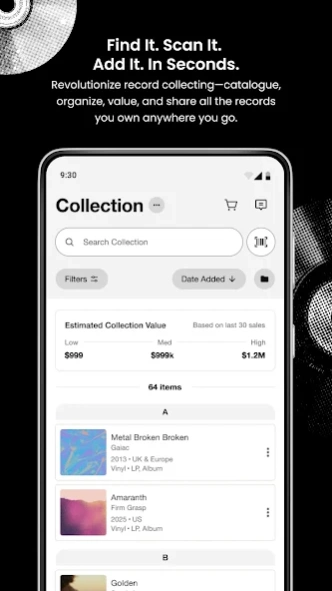
Catalog & Organize Your Collection
• Add and remove items from your Discogs Collection on the go.
• Check to see if you already own a record before you purchase it.
• Use your phone's camera to search for a release by the barcode.
• See how many items are in your Wantlist and Collection.
• Monitor the low, median, and high estimated values of your Collection.
View Marketplace Pricing
• Utilize Discogs Marketplace price-range and sales history for vinyl, CD and cassette at your fingertips.
• Know when you're striking gold with an unbeatable find by referencing marketplace data while crate digging.
• Never pay more than a record is worth by comparing prices with historical sales data.
• View your Collection's estimated value.
Add to your Wantlist
• Track your grail by adding it to your Wantlist.
• Get notifications on price changes and new listings on items you are tracking.
• Remove items from your Wantlist and add them to your Collection after purchasing.
Manage your Account
• Edit profile information for your personal Discogs account.
• Monitor your buyer and seller ratings.
• Reference your items for sale.
• Keep track of incoming messages, send new messages, and organize your inbox.
Discover New Music
• Search the database and discover new music from anywhere.
Join our Community!
• Discogs: www.discogs.com/
• Facebook: www.facebook.com/Discogs
• Instagram: www.instagram.com/Discogs/
• Twitter: www.twitter.com/Discogs
• Blog: blog.discogs.com/
For Feedback and Help
• Tell us how we can improve by sharing your thoughts: app@discogs.com
About Discogs
The company that develops Discogs is Discogs. The latest version released by its developer is 3.22.0.
To install Discogs on your Android device, just click the green Continue To App button above to start the installation process. The app is listed on our website since 2026-10-05 and was downloaded 13 times. We have already checked if the download link is safe, however for your own protection we recommend that you scan the downloaded app with your antivirus. Your antivirus may detect the Discogs as malware as malware if the download link to com.discogs.app is broken.
How to install Discogs on your Android device:
- Click on the Continue To App button on our website. This will redirect you to Google Play.
- Once the Discogs is shown in the Google Play listing of your Android device, you can start its download and installation. Tap on the Install button located below the search bar and to the right of the app icon.
- A pop-up window with the permissions required by Discogs will be shown. Click on Accept to continue the process.
- Discogs will be downloaded onto your device, displaying a progress. Once the download completes, the installation will start and you'll get a notification after the installation is finished.
Program Details
System requirements
Download information
Pricing
Version History
version 3.22.0
posted on 2026-10-05
Launching Your Seller Matches, a homepage personalization that matches you with sellers who have the most items from your wantlist. Tap a card to shop their matches, find what you're looking for, and build your collection.
version 3.21.1
posted on 2026-08-28
Sellers can now upload photos of your listings straight from the app! Take a photo and add it instantly to an item via our brand new item listing page.
This release also includes bug fixes and performance improvements.
Thanks for your feedback — we're listening and improving with every update.
version 3.0.20
posted on 2026-08-11
Thank you for your feedback, we're listening and have more updates including:
- Sellers have a new item listing page that's easier to use, with contextual price setting information
- Auth improvements
- Other bug fixes
version 3.0.19
posted on 2026-06-22
Release notes:
- Sellers - you can now search your inventory by title, artist, label, private location notes, and format.
- If Item photos exist for a listing, they appear under Item Details on the Item Listing
- Last.fm scrobble is back!
- Buyers - you can now bulk delete an entire seller cart when cleaning up your carts!
- Plus as always bug fixes. Thank you for reporting them to us!
version 3.0.19
posted on 2026-06-06
Thank you for using Discogs. This update adds in the ability to search collection by catalogue number, notes, and custom fields. In your cart, it also adds a link if a seller has more items for sale from your wantlist. Plus bug fixes across the app. Please keep sharing your feedback with customer service here https://support.discogs.com/hc/en-us/requests/new
version 3.0.16
posted on 2026-05-21
What's New?
- New Barcode Scanner! Access your native camera settings, varying zoom levels and more. Happy Scanning.
- Refinements to the new homepage, active search experience and seller inventory cards.
- Bug fixes and performance improvements.
version 3.0.14
posted on 2026-05-04
version 2.39.8
posted on 2026-04-05
- Bugfixes and auth improvements.
version 2.39.7
posted on 2025-06-26
- Bugfixes.
version 2.39.2
posted on 2025-04-03
- Privacy compliance upgrade.
- Added support for more in-app urls.
- Improved authentication error handling.
